Run AWS on Your Laptop: A 9-Part LocalStack Build Series (Part 8 - Terraform, tflocal, and GitHub Actions CI)
Provision the LocalStack stack from Parts 1-7 with Terraform, apply it with tflocal, and run integration tests in GitHub Actions CI. The capstone turns the series into a repeatable, tested workflow.

By this point the series has built up a real local stack: buckets, tables, queues, topics, and secrets. This final part flips the workflow around. Instead of recreating those pieces by hand, you'll describe them once in Terraform, apply them with tflocal, and run integration tests in GitHub Actions on every push.
What you'll need: Part 0 setup, Terraform 1.6+, Python 3.12 withpytestandboto3, a GitHub account if you want CI to actually run, and 90 minutes.
Who this is for
- You worked through the earlier LocalStack parts and now want one reproducible stack instead of a pile of one-off CLI commands.
- You want proof that the stack works both locally and in a real GitHub Actions run before you point the same Terraform at AWS.
What I verified
- A fresh prefixed LocalStack stack applied cleanly with
tflocal, creating 13 resources across S3, DynamoDB, SNS, SQS, KMS, and Secrets Manager. - A follow-up
tflocal planreturnedNo changes, so the stack was drift-free immediately after apply. - The six integration tests passed against the live stack, including SNS → SQS raw delivery, Secrets Manager retrieval, and the SQS redrive plus queue-policy wiring.
- The GitHub Actions workflow was exercised for real against
Ali-Shaikh/tflocal-test, where it applied the stack, ran the tests, and destroyed all 13 resources on cleanup.
What we're building
┌──────────────────────────────────────────────────────────┐
│  GitHub repo                                             │
│   ├── infra/                                             │
│   │    └── main.tf       (Terraform - declares stack)    │
│   ├── tests/                                             │
│   │    └── test_stack.py (pytest integration tests)      │
│   └── .github/workflows/                                 │
│        └── integration.yml (CI - runs on push/PR)        │
└──────────────────────────────────────────────────────────┘
                          │
                          ▼
            push or PR triggers workflow
                          │
                          ▼
┌──────────────────────────────────────────────────────────┐
│  GitHub Actions runner                                   │
│   1. Start LocalStack                                    │
│   2. tflocal init && apply                               │
│   3. pytest tests/                                       │
│   4. tflocal destroy (cleanup)                           │
└──────────────────────────────────────────────────────────┘
Three files, one workflow. The Terraform stack covers everything we built in Parts 1, 2, 5, and 7 (plus what supports the Lambda articles in 3, 4, 6 - those Lambdas can be added later when you're ready to wire them in via Terraform or via your existing zip-and-deploy flow).
Why tflocal and not just terraform
tflocal is a thin wrapper around terraform that generates a temporary provider override file pointing the AWS provider at LocalStack. That means your main .tf file can stay AWS-shaped, while the wrapper handles the local endpoint wiring for you.
That portability is the entire point. You're not writing two stacks. You're writing one that you exercise locally and ship to AWS unchanged.
Step 1: Project layout
cd ~/projects/localstack-series
mkdir part8-terraform
cd part8-terraform
mkdir -p infra tests .github/workflows
Three directories. Terraform code lives in infra/, integration tests in tests/, and the CI workflow in .github/workflows/.
Step 2: The Terraform stack
Save as infra/main.tf:
terraform {
  required_version = ">= 1.6.0"
  required_providers {
    aws = {
      source  = "hashicorp/aws"
      version = "~> 5.70"
    }
  }
}

provider "aws" {
  region = "us-east-1"
  # tflocal writes a temporary provider override that points these resources
  # at LocalStack when you run `tflocal apply`. Plain `terraform apply`
  # against real AWS uses your normal AWS credentials.
}

# --- Storage ---------------------------------------------------------------

resource "aws_s3_bucket" "photos" {
  bucket = "photos"
}

resource "aws_s3_bucket" "thumbnails" {
  bucket = "thumbnails"
}

resource "aws_s3_bucket_cors_configuration" "photos" {
  bucket = aws_s3_bucket.photos.id
  cors_rule {
    allowed_headers = ["*"]
    allowed_methods = ["GET", "PUT"]
    allowed_origins = ["*"]
    expose_headers  = ["ETag"]
  }
}

# --- Database --------------------------------------------------------------

resource "aws_dynamodb_table" "shortlinks" {
  name         = "shortlinks"
  billing_mode = "PAY_PER_REQUEST"
  hash_key     = "code"

  attribute {
    name = "code"
    type = "S"
  }
}

# --- Messaging -------------------------------------------------------------

resource "aws_sns_topic" "user_events" {
  name = "user-events"
}

resource "aws_sqs_queue" "welcome_emails_dlq" {
  name = "welcome-emails-dlq"
}

resource "aws_sqs_queue" "welcome_emails" {
  name                       = "welcome-emails"
  visibility_timeout_seconds = 5
  redrive_policy = jsonencode({
    deadLetterTargetArn = aws_sqs_queue.welcome_emails_dlq.arn
    maxReceiveCount     = 3
  })
}

data "aws_iam_policy_document" "allow_sns_to_sqs" {
  statement {
    effect    = "Allow"
    actions   = ["sqs:SendMessage"]
    resources = [aws_sqs_queue.welcome_emails.arn]

    principals {
      type        = "Service"
      identifiers = ["sns.amazonaws.com"]
    }

    condition {
      test     = "ArnEquals"
      variable = "aws:SourceArn"
      values   = [aws_sns_topic.user_events.arn]
    }
  }
}

resource "aws_sqs_queue_policy" "welcome_emails" {
  queue_url = aws_sqs_queue.welcome_emails.url
  policy    = data.aws_iam_policy_document.allow_sns_to_sqs.json
}

resource "aws_sns_topic_subscription" "welcome_emails" {
  topic_arn            = aws_sns_topic.user_events.arn
  protocol             = "sqs"
  endpoint             = aws_sqs_queue.welcome_emails.arn
  raw_message_delivery = true
}

# --- Secrets ---------------------------------------------------------------

resource "aws_kms_key" "third_party" {
  description = "Encryption key for third-party API secrets"
}

resource "aws_kms_alias" "third_party" {
  name          = "alias/third-party-secrets"
  target_key_id = aws_kms_key.third_party.key_id
}

resource "aws_secretsmanager_secret" "api_key" {
  name        = "third-party/api-key"
  description = "Demo API key - managed by Terraform"
  kms_key_id  = aws_kms_key.third_party.arn
}

resource "aws_secretsmanager_secret_version" "api_key" {
  secret_id = aws_secretsmanager_secret.api_key.id
  secret_string = jsonencode({
    api_key = "sk_test_4eC39HqLyjWDarjtT1zdp7dc"
  })
}

# --- Outputs ---------------------------------------------------------------

output "photos_bucket"     { value = aws_s3_bucket.photos.id }
output "thumbnails_bucket" { value = aws_s3_bucket.thumbnails.id }
output "shortlinks_table"  { value = aws_dynamodb_table.shortlinks.name }
output "topic_arn"         { value = aws_sns_topic.user_events.arn }
output "queue_url"         { value = aws_sqs_queue.welcome_emails.url }
output "secret_arn"        { value = aws_secretsmanager_secret.api_key.arn }
A few details worth understanding:
- No LocalStack endpoints in the main provider block.
tflocalgenerates a temporary override file for the local run, so the main.tfstays AWS-shaped. jsonencodefor redrive policy. SQS expects the redrive policy as a JSON string, but writing it inline as a quoted-and-escaped JSON literal is awkward.jsonencode({...})lets Terraform construct the string from a normal HCL map.aws_sqs_queue_policymatters for real AWS. SNS needs explicitsqs:SendMessagepermission on the queue. LocalStack can be more forgiving here, but the policy is part of the real architecture and should live in Terraform.raw_message_delivery = trueon the SNS-to-SQS subscription - same flag we used manually in Part 5. With it on, SQS receives just the message body; without it, the message is wrapped in an SNS envelope you'd have to unpack on every receive.kms_key_id = aws_kms_key.third_party.arnties the secret to a customer-managed key - same pattern as Part 7, just declared instead of executed.aws_secretsmanager_secret_versionstores the demo secret in Terraform state. That's acceptable for a tutorial stack. For real production secrets, keep the state backend encrypted and avoid committing long-lived live credentials into.tffiles.
Step 3: Install tflocal and apply
pipx install 'terraform-local==0.26.0'
If you're already working inside a virtual environment, pip install terraform-local==0.26.0 is fine too. The direct pipx install is the cleaner default on a laptop because it avoids polluting your system Python.
Then:
cd infra
tflocal init
tflocal apply -auto-approve
For consistency with the tests and CI examples, set the standard local AWS env vars in your shell too:
export AWS_ACCESS_KEY_ID=test
export AWS_SECRET_ACCESS_KEY=test
export AWS_DEFAULT_REGION=us-east-1
Watch the output. Thirteen resources should land cleanly:
aws_kms_key.third_party: Creation complete after 0s [id=...]
aws_kms_alias.third_party: Creation complete after 0s [id=alias/third-party-secrets]
aws_sns_topic.user_events: Creation complete after 0s [id=...]
aws_dynamodb_table.shortlinks: Creation complete after 0s [id=shortlinks]
aws_s3_bucket.photos: Creation complete after 0s [id=photos]
aws_s3_bucket.thumbnails: Creation complete after 0s [id=thumbnails]
aws_s3_bucket_cors_configuration.photos: Creation complete after 0s [id=photos]
aws_secretsmanager_secret.api_key: Creation complete after 0s [id=...]
aws_secretsmanager_secret_version.api_key: Creation complete after 0s [id=...]
aws_sqs_queue.welcome_emails_dlq: Creation complete after 25s [id=...]
aws_sqs_queue.welcome_emails: Creation complete after 25s [id=...]
aws_sqs_queue_policy.welcome_emails: Creation complete after 25s [id=...]
aws_sns_topic_subscription.welcome_emails: Creation complete after 0s [id=...]

Apply complete! Resources: 13 added, 0 changed, 0 destroyed.

Outputs:
photos_bucket     = "photos"
thumbnails_bucket = "thumbnails"
shortlinks_table  = "shortlinks"
topic_arn         = "arn:aws:sns:us-east-1:000000000000:user-events"
queue_url         = "http://sqs.us-east-1.localhost.localstack.cloud:4566/000000000000/welcome-emails"
secret_arn        = "arn:aws:secretsmanager:us-east-1:000000000000:secret:third-party/api-key-..."
The SQS queues take 25 seconds each - that's LocalStack waiting for the queue to be queryable post-create, mimicking the eventual consistency you'd see in real AWS.
Run tflocal plan afterwards and you should see "No changes. Your infrastructure matches the configuration." That's the test that you can rerun apply safely without drift - the foundational property of any IaC stack.
Step 4: Integration tests
A passing terraform apply proves resources were created. Integration tests prove the resources actually work. Save as tests/test_stack.py:
import json
import os
import uuid

import boto3

ENDPOINT = os.environ.get("AWS_ENDPOINT_URL", "http://localhost:4566")
REGION = os.environ.get("AWS_DEFAULT_REGION", "us-east-1")
PHOTOS_BUCKET = os.environ.get("PHOTOS_BUCKET", "photos")
THUMBNAILS_BUCKET = os.environ.get("THUMBNAILS_BUCKET", "thumbnails")
SHORTLINKS_TABLE = os.environ.get("SHORTLINKS_TABLE", "shortlinks")
TOPIC_ARN = os.environ.get("TOPIC_ARN", "arn:aws:sns:us-east-1:000000000000:user-events")
QUEUE_NAME = os.environ.get("QUEUE_NAME", "welcome-emails")
SECRET_NAME = os.environ.get("SECRET_NAME", "third-party/api-key")


def aws(service):
    return boto3.client(
        service,
        endpoint_url=ENDPOINT,
        region_name=REGION,
        aws_access_key_id="test",
        aws_secret_access_key="test",
    )


def aws_s3():
    return boto3.client(
        "s3",
        endpoint_url=ENDPOINT,
        region_name=REGION,
        aws_access_key_id="test",
        aws_secret_access_key="test",
        config=boto3.session.Config(s3={"addressing_style": "path"}),
    )


def queue_url():
    return aws("sqs").get_queue_url(QueueName=QUEUE_NAME)["QueueUrl"]


def test_s3_buckets_exist():
    names = [b["Name"] for b in aws_s3().list_buckets()["Buckets"]]
    assert PHOTOS_BUCKET in names
    assert THUMBNAILS_BUCKET in names


def test_s3_roundtrip_in_photos_bucket():
    s3 = aws_s3()
    key = f"test-{uuid.uuid4()}.txt"
    s3.put_object(Bucket=PHOTOS_BUCKET, Key=key, Body=b"hello from integration test")
    obj = s3.get_object(Bucket=PHOTOS_BUCKET, Key=key)
    assert obj["Body"].read() == b"hello from integration test"
    s3.delete_object(Bucket=PHOTOS_BUCKET, Key=key)


def test_dynamodb_shortlinks_table_works():
    ddb = aws("dynamodb")
    code = f"itest-{uuid.uuid4().hex[:8]}"
    ddb.put_item(TableName=SHORTLINKS_TABLE, Item={
        "code": {"S": code},
        "long_url": {"S": "https://example.com/from-tf"},
        "click_count": {"N": "0"},
    })
    out = ddb.get_item(TableName=SHORTLINKS_TABLE, Key={"code": {"S": code}})
    assert out["Item"]["long_url"]["S"] == "https://example.com/from-tf"
    ddb.delete_item(TableName=SHORTLINKS_TABLE, Key={"code": {"S": code}})


def test_sns_to_sqs_with_raw_delivery():
    sns, sqs = aws("sns"), aws("sqs")
    sns.publish(
        TopicArn=TOPIC_ARN,
        Message=json.dumps({"user_id": "itest", "email": "[email protected]"}),
    )

    out = sqs.receive_message(QueueUrl=queue_url(), MaxNumberOfMessages=5, WaitTimeSeconds=10)
    received = out.get("Messages", [])
    assert received, "no message received from the queue within 10s"
    body = json.loads(received[0]["Body"])
    assert body["email"] == "[email protected]"
    sqs.delete_message(QueueUrl=queue_url(), ReceiptHandle=received[0]["ReceiptHandle"])


def test_secrets_manager_secret_decrypts():
    out = aws("secretsmanager").get_secret_value(SecretId=SECRET_NAME)
    secret = json.loads(out["SecretString"])
    assert secret["api_key"].startswith("sk_")
    assert "AWSCURRENT" in out["VersionStages"]


def test_sqs_dlq_and_policy_are_wired():
    sqs = aws("sqs")
    attrs = sqs.get_queue_attributes(QueueUrl=queue_url(), AttributeNames=["RedrivePolicy", "Policy"])
    redrive = json.loads(attrs["Attributes"]["RedrivePolicy"])
    assert int(redrive["maxReceiveCount"]) == 3
    assert "welcome-emails-dlq" in redrive["deadLetterTargetArn"]

    policy = json.loads(attrs["Attributes"]["Policy"])
    stmt = policy["Statement"][0]
    assert stmt["Action"] == "sqs:SendMessage"
    assert "sns.amazonaws.com" in stmt["Principal"]["Service"]
    assert TOPIC_ARN == stmt["Condition"]["ArnEquals"]["aws:SourceArn"]
Six tests covering each major piece of the stack: buckets exist, S3 round-trip works, DynamoDB writes/reads cleanly, SNS-to-SQS fan-out delivers messages, Secrets Manager returns the JSON-encoded API key with the right version stage, and the SQS redrive policy plus SNS queue policy are correctly wired. The helper fetches the queue URL by name, so the same test file works locally and in CI without manually exporting QUEUE_URL.
The aws_s3() helper forces path-style addressing because it's the least surprising option when you're pointing SDK calls at LocalStack instead of real S3 endpoints.
Run them locally:
pip install pytest boto3
pytest -v tests/test_stack.py
tests/test_stack.py::test_s3_buckets_exist                PASSED [ 16%]
tests/test_stack.py::test_s3_roundtrip_in_photos_bucket   PASSED [ 33%]
tests/test_stack.py::test_dynamodb_shortlinks_table_works PASSED [ 50%]
tests/test_stack.py::test_sns_to_sqs_with_raw_delivery     PASSED [ 66%]
tests/test_stack.py::test_secrets_manager_secret_decrypts PASSED [ 83%]
tests/test_stack.py::test_sqs_dlq_and_policy_are_wired    PASSED [100%]

============================== 6 passed in 0.57s ==============================
Six tests, well under a second in my latest rerun. Real AWS calls would take longer for the same suite, which is one of the practical wins of LocalStack in CI.
Step 5: The GitHub Actions workflow
Save as .github/workflows/integration.yml:
name: Integration tests against LocalStack

on:
  push:
    branches: [main]
  pull_request:
    branches: [main]
  workflow_dispatch:

jobs:
  integration:
    runs-on: ubuntu-latest
    timeout-minutes: 15

    env:
      AWS_DEFAULT_REGION: us-east-1
      AWS_ACCESS_KEY_ID: test
      AWS_SECRET_ACCESS_KEY: test
      AWS_ENDPOINT_URL: http://localhost:4566

    steps:
      - name: Checkout
        uses: actions/checkout@v6

      - name: Set up Python
        uses: actions/setup-python@v6
        with:
          python-version: '3.12'

      - name: Set up Terraform
        uses: hashicorp/setup-terraform@v4
        with:
          terraform_version: 1.15.1

      - name: Start LocalStack
        uses: LocalStack/[email protected]
        with:
          image-tag: '2026.5.3'
          install-awslocal: 'true'
        env:
          LOCALSTACK_AUTH_TOKEN: ${{ secrets.LOCALSTACK_AUTH_TOKEN }}

      - name: Install tflocal and pytest
        run: pip install terraform-local==0.26.0 pytest boto3

      - name: Apply Terraform
        working-directory: ./infra
        run: |
          tflocal init -input=false
          terraform validate
          tflocal apply -auto-approve -input=false

      - name: Run integration tests
        run: pytest -v tests/

      - name: Tear down (always runs, even on failure)
        if: always()
        working-directory: ./infra
        run: tflocal destroy -auto-approve -input=false
A few choices worth understanding:
- Pinned action versions are deliberate. The workflow above was rechecked with
actions/checkout@v6,actions/setup-python@v6,hashicorp/setup-terraform@v4, andLocalStack/[email protected], avoiding the older Node 20 runner deprecation warning and confirming the current LocalStack action release still works cleanly. LocalStack/setup-localstackaction handles the install + start + health check. It also takes care of mounting the Docker socket, which Lambda needs (Parts 3, 4, 6) - rolling your own service container is more lines and easier to get wrong.LOCALSTACK_AUTH_TOKENfrom GitHub Secrets. Add your token underSettings → Secrets and variables → Actions → New repository secret. Never commit it.- Same
AWS_ENDPOINT_URL, key, secret env vars that you'd set locally. Tests don't know they're running in CI, and because they resolve the queue URL fromQUEUE_NAME, they don't need a CI-only export step. if: always()on the destroy step ensures cleanup runs even when tests fail - leaks state in CI is the kind of thing that bites two PRs later.workflow_dispatchlets you trigger the run manually from the GitHub Actions UI, useful when you're iterating on the workflow itself.
Lint it before pushing:
brew install actionlint
actionlint .github/workflows/integration.yml
# (no output = no issues)
Step 6: Push it
git init
git add .gitignore infra/ tests/ .github/
git commit -m "chore: integration test stack via Terraform + LocalStack"
git remote add origin https://github.com/<you>/<your-repo>.git
git push -u origin main
Open the Actions tab in GitHub. On my verification repo, the real run against GitHub Actions finished in about 3.5 minutes end to end:
- ~30s for runner setup
- ~30s for LocalStack to start
- ~1 minute for
tflocal apply(LocalStack's lazy service init plus SQS settling) - ~5 seconds for the test suite
- ~30s for
tflocal destroy
Here is the latest passing run after the action-version bump:
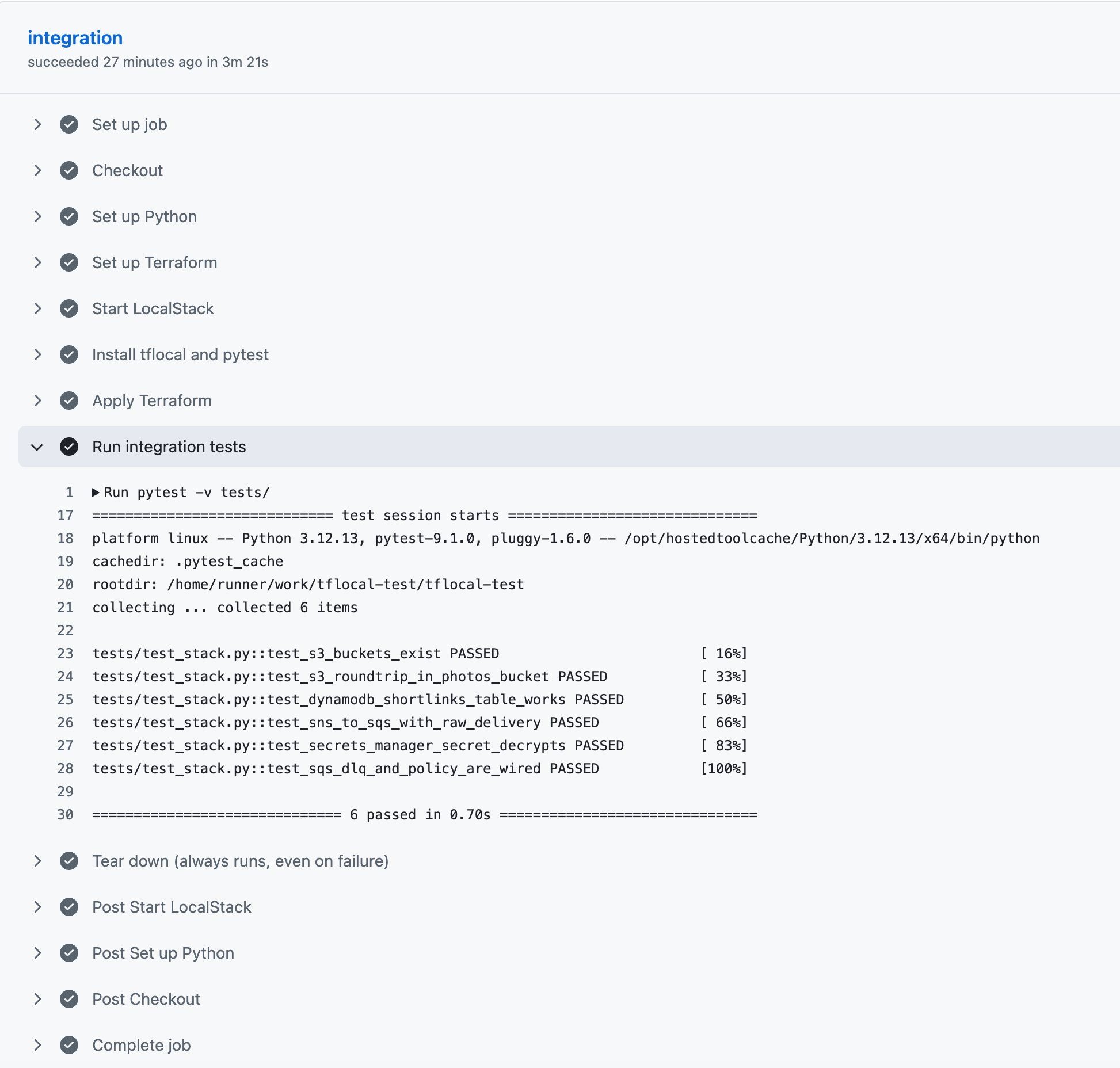
After that, the loop is fast. Every PR validates the stack end-to-end. Every push to main proves the Terraform applies cleanly. No AWS bill.
One thing that changed during verification: an earlier pass of this workflow still used older GitHub Action versions and tripped a Node 20 deprecation warning on hosted runners. Bumping those actions to their current major versions fixed that cleanly without changing the Terraform or test logic. I then re-ran the workflow after bumping LocalStack/setup-localstack to v0.3.2, and the full apply → test → destroy path still passed on GitHub-hosted runners.
Step 7: Same code, real AWS
The whole point of writing the stack in Terraform is that you can switch targets by changing the binary you call:
# Local - against LocalStack
tflocal apply

# Real AWS - same .tf, your AWS credentials in ~/.aws/credentials
terraform apply
That's it. The main provider config has no LocalStack-specific endpoints. tflocal handles the local override, while the integration tests use AWS_ENDPOINT_URL when it's set and standard AWS endpoints when it isn't - same boto3, same code paths.
Two things to watch for when you make the jump:
- Real costs.
aws_kms_keyis $1/month.aws_dynamodb_tableis free at low throughput on PAY_PER_REQUEST. SQS, SNS, S3, Secrets Manager all have free tiers but bills add up. Runterraform destroywhen you're not actively using the stack. - IAM strictness. LocalStack only enforces IAM when you turn enforcement on. Real AWS always does. Add
aws_iam_roleandaws_iam_role_policyresources for any Lambda or service that needs to call other services, and test the IAM in a sandbox account before promoting to production.
If you do move this to AWS for real, add a remote Terraform backend early. S3 for state plus DynamoDB for locking is the normal shape, and it stops your first shared environment from turning into "who last touched terraform.tfstate?"
A note on managing existing resources
The first time you run this Terraform after manually building things in Parts 1-7, the resources already exist. Two ways to reconcile:
terraform import- pull each pre-existing resource into Terraform state without recreating it. The recommended approach when you've got data you want to keep.- Delete first, then apply - simplest, fine when there's no important state. Use the scoped delete pattern below: only the named resources from your stack, never a list-and-loop wipe.
# Scoped, safe - only the resources this Terraform stack manages
for b in photos thumbnails; do
  awslocal s3 rb s3://$b --force 2>/dev/null
done
awslocal dynamodb delete-table --table-name shortlinks 2>/dev/null
for q in welcome-emails welcome-emails-dlq; do
  url=$(awslocal sqs get-queue-url --queue-name $q --query QueueUrl --output text 2>/dev/null)
  [ -n "$url" ] && awslocal sqs delete-queue --queue-url $url 2>/dev/null
done
awslocal sns delete-topic --topic-arn arn:aws:sns:us-east-1:000000000000:user-events 2>/dev/null
awslocal secretsmanager delete-secret --secret-id third-party/api-key --force-delete-without-recovery 2>/dev/null
awslocal kms delete-alias --alias-name alias/third-party-secrets 2>/dev/null
Never run a for r in $(aws ... list-*); do delete $r; done loop against a shared LocalStack instance - you'll wipe everything, including resources from work unrelated to the stack you're cleaning up. The pattern above only touches the named resources this Terraform stack manages.
Common pitfalls
tflocal applyfails withconnection refusedon S3 buckets. LocalStack uses virtual-hosted-style S3 URLs by default. When you're testing against a remote LocalStack host instead oflocalhost:4566, adds3_use_path_style = truein a local-only override.Apply complete!but resources don't show up inawslocal s3 ls. Two LocalStack instances running, on different ports.docker psto find the duplicate.- GitHub Actions workflow hangs on "Start LocalStack". Auth token isn't set, or the
LocalStack/setup-localstackAction version is pinned to something the registry has dropped. Bump the version pin and re-run. - Tests pass locally but fail in CI. The CI runner is a fresh container - it doesn't share your local LocalStack state. The CI workflow needs to apply the Terraform itself before testing. Check the order of steps.
terraform destroyleaves orphans. Resources created outside Terraform (manually via the AWS CLI, or by a previous failed run) aren't tracked in state.terraform importfirst or delete by name.
Cleanup
This walkthrough uses Terraform's default local state, which is why you see terraform.tfstate* in the cleanup step. There's no remote backend configured in the local-first version of this stack.
Locally:
# Tear down the whole stack
cd infra && tflocal destroy -auto-approve

# (Optional) wipe Terraform local state and lock
rm -rf .terraform .terraform.lock.hcl terraform.tfstate*
In CI: the workflow's if: always() destroy step handles it. Watch the Actions log if a run fails to confirm it actually ran.
Save this as a checkpoint
Part 8 doesn't need an init-hooks bootstrap script of its own - the Terraform is the bootstrap. If you've cloned the repo and want LocalStack to come up with everything pre-applied, the order is:
docker compose up -d(Part 0's compose)cd infra && tflocal init && tflocal apply -auto-approve(this article)
That's the full project. If you're not using LocalStack persistence, a single tflocal apply brings the stack back whenever the container restarts.
If you'd rather keep the init-hooks pattern from earlier articles, you can drop a script at init/ready.d/08-part8-tflocal.sh that calls tflocal apply on container ready, but it's a circular setup (Terraform-managed state plus init-hook state on the same resources tends to cause drift warnings). Cleaner to pick one mechanism and stick with it.
What you've actually got now
- A real AWS-shaped backend running locally - eight services, thirteen resources, one Terraform file.
- An integration test suite that runs in under a second and exercises every major piece of the stack.
- A GitHub Actions workflow that runs the same suite on every push and PR, no AWS account required.
- The same
.tffile applies cleanly against real AWS the moment you swaptflocalforterraform.
That's the full loop: iterate locally → test in CI → ship to production with no rewrites.
Where this series leaves you
Nine articles total, counting Part 0 through Part 8, one repo. You started with awslocal s3 mb and finished with a fully-tested, IaC-managed backend that ships on identical code to real AWS. Along the way:
- Part 0 - set up LocalStack
- Part 1 - S3 with presigned URLs
- Part 2 - DynamoDB shortener data layer
- Part 3 - Lambda + S3 events thumbnailer
- Part 4 - API Gateway + Lambda + JWT auth
- Part 5 - SQS + SNS background jobs with DLQ
- Part 6 - EventBridge + Step Functions workflow
- Part 7 - Secrets Manager + KMS
- Part 8 - Terraform + GitHub Actions CI
Where to go from here: take this repo, point it at a real AWS sandbox account, watch the same code provision a real environment. Then start building something on top - the URL shortener fleshed out into a side project, the photo pipeline turned into a personal photo backup, whatever's been in your "I'd build this if AWS didn't cost money" notes file. The local loop is the same; the deploy target is your call.
If you've built something on this scaffolding, drop me a line.
Sources