Run AWS on Your Laptop: A 9-Part LocalStack Build Series (Part 5 - SQS, SNS, and a Dead-Letter Queue)
Build a real async job pipeline on LocalStack with an SNS topic, an SQS queue, and a DLQ. Watch a poison message retry three times, land in the DLQ, and inspect what to do next.

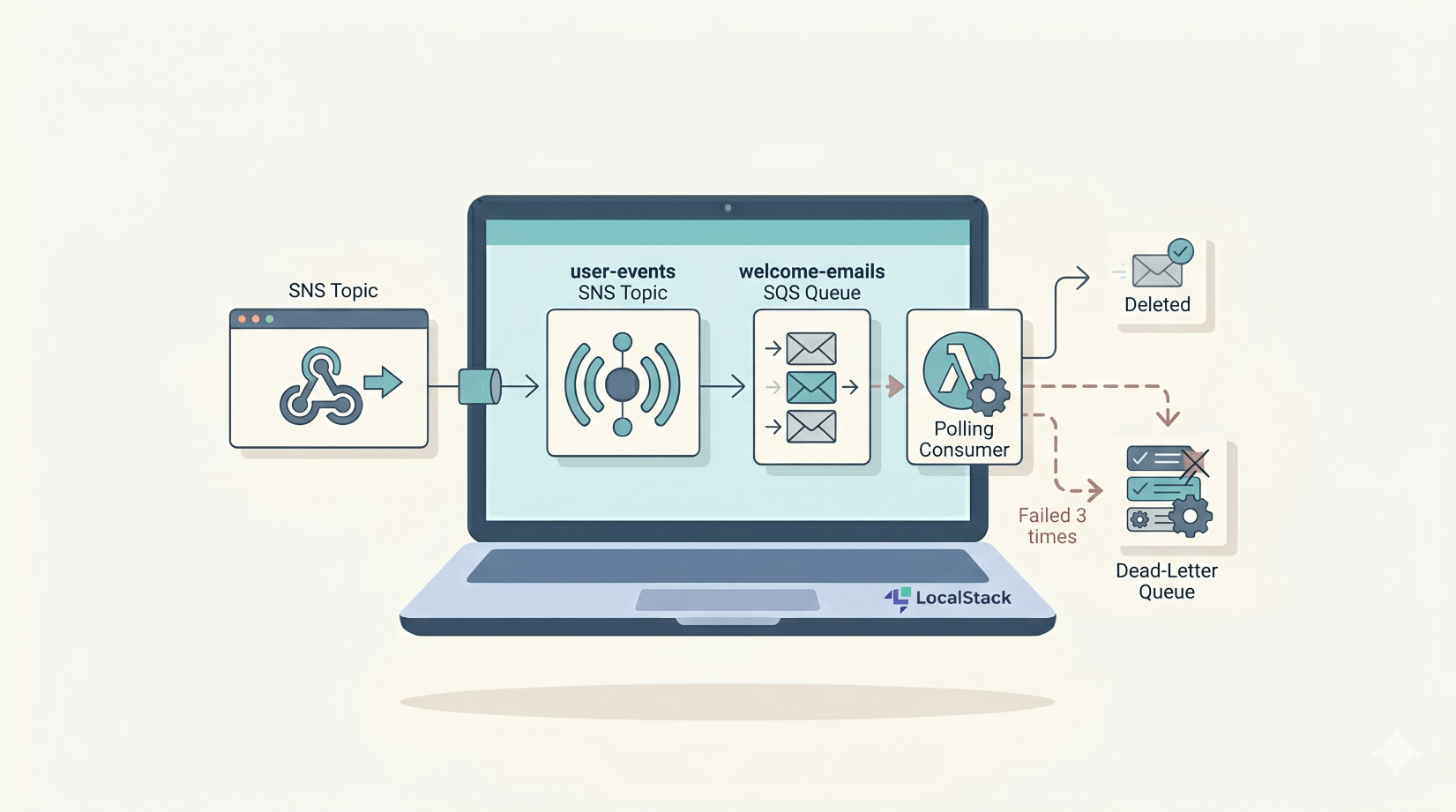
Every real app eventually needs background jobs: sending welcome emails, processing notifications, retrying webhooks. We'll build the canonical AWS pattern on LocalStack: an SNS topic for fan-out, an SQS queue for the job, a dead-letter queue for poison messages, and a redrive policy that ties them together.
What you'll need: Part 0 setup, Python 3.x with boto3, and 30 minutes.What we're building
The three components work together like this:
producer (CLI/app)
        │
        ▼
   SNS topic ─── fan-out ───┬───▶  SQS welcome-emails queue
                            │              │
                            │              ▼
                            │       consumer (poll → process → delete)
                            │              │
                            │              │ fails 3 times
                            │              ▼
                            │       SQS welcome-emails-dlq
                            │
                            └───▶  (other subscribers - analytics, audit, etc.)
The shape that maps onto pretty much every real app:
- SNS topic for fan-out - many subscribers can listen to the same event without the producer caring.
- SQS queue for the job - durable, at-least-once delivery with retries and a DLQ.
- Dead-letter queue for poison messages - anything that fails repeatedly lands here for inspection rather than blocking the queue forever.
In a real app, the producer might be your signup API publishing a user.created event, or an image-processing pipeline publishing photo.ready. The consumer might send a welcome email, create a CRM contact, fire a webhook to another system, or queue a follow-up job for indexing and search. We'll build the polling worker because it's the easiest way to watch the full retry and dead-letter flow without extra moving parts.
Why SNS and SQS, not just one?
Quick answer if you've not used either at scale:
- SQS alone works fine for one producer talking to one consumer. The moment you want a second consumer (analytics, audit log, notifications system) listening to the same events, you'd have to fan out manually or put a copy on each queue.
- SNS alone fans out messages to subscribers, but it doesn't give you queue buffering or consumer-side retry behaviour.
- SNS → SQS → consumer is the combination. SNS handles fan-out, SQS gives you durability and retries, the DLQ catches what slips through.
It's three pieces of infrastructure and most beginners skip straight to "I'll just call my consumer directly". Six months later, that's usually the choice they wish they hadn't made.
Step 1: Project folder
cd ~/projects/localstack-series
mkdir part5-queues
cd part5-queues
Command style in this part
This part uses awslocal in the main examples because it's shorter. If you prefer the plain AWS CLI, use the same command with aws --endpoint-url=http://localhost:4566 ... instead.
# awslocal
awslocal sqs list-queues

# aws cli
aws --endpoint-url=http://localhost:4566 sqs list-queues
If your LocalStack box lives on another IP, swap localhost for that host in the --endpoint-url value.
Step 2: Create the dead-letter queue first
You need the DLQ's ARN before you can create the main queue (the redrive policy references it).
awslocal sqs create-queue --queue-name welcome-emails-dlq

DLQ_URL=$(awslocal sqs get-queue-url --queue-name welcome-emails-dlq \
  --query QueueUrl --output text)

DLQ_ARN=$(awslocal sqs get-queue-attributes --queue-url $DLQ_URL \
  --attribute-names QueueArn --query 'Attributes.QueueArn' --output text)

echo $DLQ_ARN
# arn:aws:sqs:us-east-1:000000000000:welcome-emails-dlq
Step 3: Create the main queue with a redrive policy
awslocal sqs create-queue --queue-name welcome-emails \
  --attributes "{\"RedrivePolicy\":\"{\\\"deadLetterTargetArn\\\":\\\"$DLQ_ARN\\\",\\\"maxReceiveCount\\\":\\\"3\\\"}\",\"VisibilityTimeout\":\"5\"}"

QUEUE_URL=$(awslocal sqs get-queue-url --queue-name welcome-emails \
  --query QueueUrl --output text)

QUEUE_ARN=$(awslocal sqs get-queue-attributes --queue-url $QUEUE_URL \
  --attribute-names QueueArn --query 'Attributes.QueueArn' --output text)
Two attributes worth understanding:
maxReceiveCount: 3- after three receives without a successful delete, the message gets moved to the DLQ. The retry budget. Three is a sane default; raise it if your downstream is flaky.VisibilityTimeout: 5seconds - when a consumer receives a message, it becomes invisible to other consumers for this long. If the consumer doesn't delete the message in that window, it becomes eligible to be received again. We're setting it short for testing; in production it should be comfortably longer than your longest expected processing time.
The escaping on that JSON-inside-JSON --attributes parameter is annoying - it's the AWS CLI's way of life. A cleaner alternative is --attributes file://attributes.json with a properly-quoted file.
Step 4: Create the SNS topic and subscribe the queue
TOPIC_ARN=$(awslocal sns create-topic --name user-events \
  --query 'TopicArn' --output text)

SUB_ARN=$(awslocal sns subscribe \
  --topic-arn $TOPIC_ARN \
  --protocol sqs \
  --notification-endpoint $QUEUE_ARN \
  --query 'SubscriptionArn' --output text)
Set raw message delivery so SQS receives just the message body, not the full SNS envelope:
awslocal sns set-subscription-attributes \
  --subscription-arn $SUB_ARN \
  --attribute-name RawMessageDelivery \
  --attribute-value true
Without RawMessageDelivery=true, the consumer would have to parse SNS's JSON wrapper ({ "Type": "Notification", "MessageId": "...", "Message": "<your actual message>" }) on every receive. With it on, the consumer just gets your message body. Almost always what you want.
Step 5: The consumer
Create consumer.py:
The key behaviour to notice before you read the code: sqs.delete_message(...) is only called on success. If the consumer raises, no delete happens, the visibility timeout expires, the message becomes eligible to be received again, and the receive count ticks up. After three receives without a successful delete, SQS moves it to the DLQ.
import json
import os
import sys

import boto3

ENDPOINT = os.environ.get("AWS_ENDPOINT_URL") or "http://localhost:4566"
QUEUE_URL = os.environ["QUEUE_URL"]

sqs = boto3.client("sqs", endpoint_url=ENDPOINT, region_name="us-east-1")


def process(message_body):
    payload = json.loads(message_body)
    if payload.get("email") == "[email protected]":
        raise RuntimeError("Simulated downstream failure")
    print(f"  ✓ Sent welcome email to {payload['email']} (user_id={payload.get('user_id')})")


def poll_once(max_messages=10, wait_seconds=2):
    out = sqs.receive_message(
        QueueUrl=QUEUE_URL,
        MaxNumberOfMessages=max_messages,
        WaitTimeSeconds=wait_seconds,
    )
    messages = out.get("Messages", [])
    print(f"Polled - {len(messages)} message(s)")

    for msg in messages:
        try:
            process(msg["Body"])
        except Exception as e:
            print(f"  ✗ {e} - leaving message in queue for retry")
            continue
        sqs.delete_message(QueueUrl=QUEUE_URL, ReceiptHandle=msg["ReceiptHandle"])


if __name__ == "__main__":
    poll_once(wait_seconds=int(sys.argv[1]) if len(sys.argv) > 1 else 2)
WaitTimeSeconds enables long polling - the consumer waits up to N seconds for a message rather than returning empty immediately. Long polling drops API costs and improves latency. Use it.
If your LocalStack box lives on another IP, export AWS_ENDPOINT_URL=http://<that-ip>:4566 before running the consumer. The default localhost:4566 is correct only when the worker and LocalStack are on the same machine.
Step 6: Test the happy path and the poison path together
Publish three messages - two clean, one deliberately failing:
awslocal sns publish --topic-arn $TOPIC_ARN \
  --message '{"user_id":"u-1","email":"[email protected]"}'

awslocal sns publish --topic-arn $TOPIC_ARN \
  --message '{"user_id":"u-2","email":"[email protected]"}'

awslocal sns publish --topic-arn $TOPIC_ARN \
  --message '{"user_id":"u-3","email":"[email protected]"}'
Run the consumer four times, with a 6-second pause between each (long enough for the visibility timeout to release the poison message back into the queue):
QUEUE_URL=$QUEUE_URL python3 consumer.py
# Pass 1
Polled - 3 message(s)
  ✓ Sent welcome email to [email protected] (user_id=u-1)
  ✗ Simulated downstream failure - leaving message in queue for retry
  ✓ Sent welcome email to [email protected] (user_id=u-3)

sleep 6 && QUEUE_URL=$QUEUE_URL python3 consumer.py
# Pass 2
Polled - 1 message(s)
  ✗ Simulated downstream failure - leaving message in queue for retry

sleep 6 && QUEUE_URL=$QUEUE_URL python3 consumer.py
# Pass 3
Polled - 1 message(s)
  ✗ Simulated downstream failure - leaving message in queue for retry

sleep 6 && QUEUE_URL=$QUEUE_URL python3 consumer.py
# Pass 4
Polled - 0 message(s)
The poison message has been moved to the DLQ:
awslocal sqs receive-message --queue-url $DLQ_URL \
  --max-number-of-messages 5 --wait-time-seconds 2 \
  --query 'Messages[*].Body' --output text
# {"user_id":"u-2","email":"[email protected]"}
There it is. The two well-formed messages drained on the first pass. The poison message reached maxReceiveCount=3 without a successful delete, disappeared from the main queue after the third failed receive, and showed up in the DLQ by the time the fourth poll ran.
What to actually do with messages in the DLQ
Don't just leave them there forever. The DLQ is an inbox, not a graveyard. Two patterns worth knowing:
- Inspect and replay. Pull the messages, fix whatever broke (a bug in the consumer, a third-party outage), then either re-publish them to the topic or move them back to the main queue with
aws sqs start-message-move-task. That's the normal replay API on AWS. On the 2026-05-26 homelab LocalStack rerun, the command completed but did not actually move the message, so re-publishing to the topic is the reliable local fallback there. - Alarm on depth. A non-zero DLQ depth means someone needs to look at this. Wire a CloudWatch alarm on
ApproximateNumberOfMessagesVisibleand route it to PagerDuty / Opsgenie / your phone. We'll touch alarms in a later article.
Wiring a Lambda consumer instead (the production pattern)
What we built above polls in a loop, which is perfect for learning and fine for a small service. In production, most teams use a Lambda triggered by SQS via an "event source mapping". Same redrive behaviour, no Python worker to keep alive.
# (Build a Lambda using the deployment flow from [Part 3](https://alishaikh.me/run-aws-on-your-laptop-a-9-part-localstack-build-series-part-3-lambda-s3-thumbnailer-pipeline/) or [Part 4](https://alishaikh.me/run-aws-on-your-laptop-a-9-part-localstack-build-series-part-4-api-gateway-lambda-and-jwt-auth/), then:)
awslocal lambda create-event-source-mapping \
  --function-name welcome-mailer \
  --event-source-arn $QUEUE_ARN \
  --batch-size 10 \
  --maximum-batching-window-in-seconds 5
Now Lambda polls SQS, invokes your function with batches of up to 10 messages, and the same queue visibility timeout and DLQ policy still apply. Failures bubble up the same way.
The polling consumer is the right thing to build first because every step is observable. The Lambda version is the right thing to ship.
Common pitfalls
- Message lands in the queue but the consumer never sees it. You forgot
RawMessageDelivery=trueon the subscription, and yourjson.loads(message_body)is choking on the SNS envelope. Either set the flag orjson.loads(json.loads(body)["Message"]). - Poison message never goes to the DLQ.
maxReceiveCountis too high, or the consumer is silently swallowing the exception and deleting the message. Print failures and don't catch broadly. - Messages that should be dead-lettered come back forever. The visibility timeout is shorter than your processing time. The consumer is still working when SQS thinks it's hung, so the message comes back. Make
VisibilityTimeoutcomfortably longer than your worst-case job. InvalidParameterValueExceptiononcreate-queue. The redrive policy JSON is malformed (the escaping on the CLI is fiddly). Use a--attributes file://attrs.jsoninstead.- Queue policy permission errors when SNS tries to deliver. LocalStack's Hobby tier doesn't enforce IAM strictly, so this is rare on LocalStack but bites in real AWS - set the queue policy to allow
sns.amazonaws.comto send.
Cleanup commands worth knowing
# Drain all messages
awslocal sqs purge-queue --queue-url $QUEUE_URL
awslocal sqs purge-queue --queue-url $DLQ_URL

# Remove the queues and topic
awslocal sqs delete-queue --queue-url $QUEUE_URL
awslocal sqs delete-queue --queue-url $DLQ_URL
awslocal sns delete-topic --topic-arn $TOPIC_ARN
If you're going to Part 6, keep the topic. Step Functions can publish to it.
Save this as a checkpoint
The full queue topology, DLQ, main queue with redrive policy, topic, and the raw-delivery subscription, re-creates itself on every container start.
Save as init/ready.d/05-part5-queues.sh:
The names in this script are fixed on purpose. That keeps the bootstrap predictable across restarts and avoids creating a fresh queue/topic pair every time the container comes back up.
#!/usr/bin/env bash
# Part 5 checkpoint - SQS welcome-emails + DLQ + SNS user-events topic
awslocal sqs create-queue --queue-name welcome-emails-dlq 2>/dev/null || true

DLQ_URL=$(awslocal sqs get-queue-url --queue-name welcome-emails-dlq --query QueueUrl --output text 2>/dev/null)
DLQ_ARN=$(awslocal sqs get-queue-attributes --queue-url "$DLQ_URL" \
  --attribute-names QueueArn --query 'Attributes.QueueArn' --output text 2>/dev/null)

awslocal sqs create-queue --queue-name welcome-emails \
  --attributes "{\"RedrivePolicy\":\"{\\\"deadLetterTargetArn\\\":\\\"$DLQ_ARN\\\",\\\"maxReceiveCount\\\":\\\"3\\\"}\",\"VisibilityTimeout\":\"5\"}" 2>/dev/null || true

awslocal sns create-topic --name user-events 2>/dev/null || true

QUEUE_ARN="arn:aws:sqs:us-east-1:000000000000:welcome-emails"
TOPIC_ARN="arn:aws:sns:us-east-1:000000000000:user-events"

# Avoid creating duplicate subscriptions on each restart
EXISTING=$(awslocal sns list-subscriptions-by-topic --topic-arn "$TOPIC_ARN" \
  --query "Subscriptions[?Endpoint=='$QUEUE_ARN'].SubscriptionArn" --output text 2>/dev/null)
if [ -z "$EXISTING" ] || [ "$EXISTING" = "None" ]; then
  SUB_ARN=$(awslocal sns subscribe --topic-arn "$TOPIC_ARN" --protocol sqs \
    --notification-endpoint "$QUEUE_ARN" --query 'SubscriptionArn' --output text 2>/dev/null)
  awslocal sns set-subscription-attributes --subscription-arn "$SUB_ARN" \
    --attribute-name RawMessageDelivery --attribute-value true 2>/dev/null || true
fi

echo "[bootstrap] part 5 - queues + topic + subscription ready"
chmod +x init/ready.d/05-part5-queues.sh
Jumping in at Part 5 from scratch? You only need Part 0 setup for the queue topology itself. If you want to test the "producer from the shorten Lambda" story later, keep Part 4 around too.
What we'll wire up next
You've got fan-out, queueing, retries, and dead-lettering - the building blocks of every real async pipeline. The next part graduates from "send one message" to orchestration: an EventBridge rule starts a Step Functions state machine that fans across multiple Lambdas (resize → tag → notify → archive). The kind of workflow that's too gnarly to express in plain queue messaging and is exactly what Step Functions exists for.
The full series
- Part 0 - Start here: series intro and installing LocalStack
- Part 1 - S3 locally: buckets, presigned URLs, and a tiny photo uploader
- Part 2 - DynamoDB locally: building a URL shortener data layer
- Part 3 - Lambda + S3 events: an image thumbnailer pipeline
- Part 4 - API Gateway + Lambda + JWT auth: a real HTTP API
- Part 5 - SQS + SNS: a background job queue with a dead-letter queue (this article)
- Part 6 - EventBridge + Step Functions: orchestrating a photo-processing workflow
- Part 7 - Secrets Manager + KMS: handling secrets and encryption locally
- Part 8 - Terraform (tflocal) + GitHub Actions: integration tests against LocalStack
Sources
Related on alishaikh.me