Run AWS on Your Laptop: A 9-Part LocalStack Build Series (Part 3 - Lambda S3 Thumbnailer Pipeline)
Wire Lambda to S3 upload events on LocalStack. Upload a photo, get a 256px thumbnail in another bucket automatically, and learn the `localhost.localstack.cloud` networking gotcha before it wastes an evening.

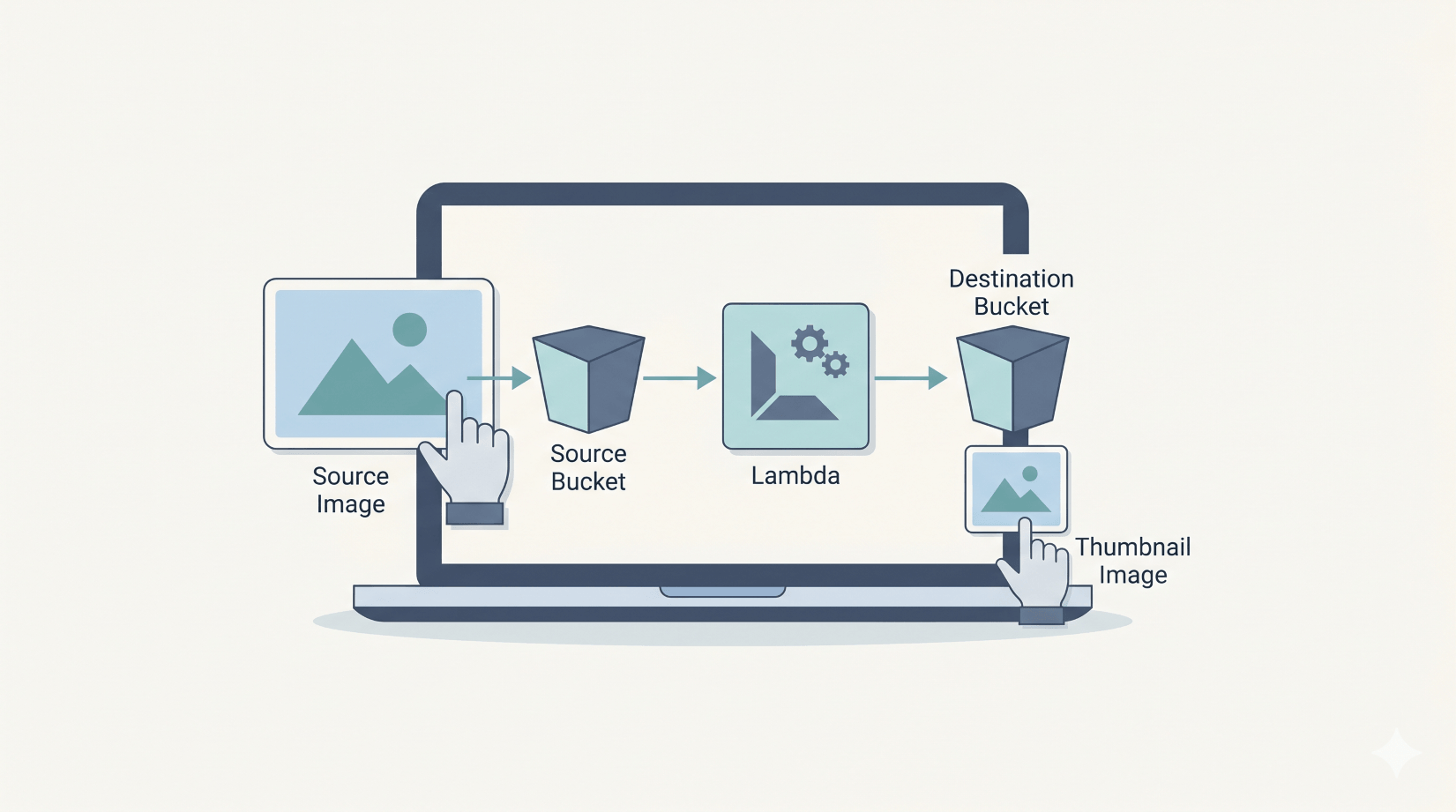
If you've already worked through Part 2 - DynamoDB URL Shortener Data Layer, this is where the series turns event-driven. Upload a photo to S3, a Lambda fires automatically, and a thumbnail appears in another bucket. By the end you'll have a working pipeline you can adapt for any "react to upload" use case - virus scanning, OCR, watermarking, you name it.
What you'll need: Part 0 setup, Part 1 finished (we'll reuse the photos bucket convention), Python 3.12, Docker on the machine running LocalStack (because LocalStack executes Lambda invocations through Docker containers), and 45 minutes.What we're building
Upload to s3://photos/foo.jpg
        │
        ▼
S3 ObjectCreated event
        │
        ▼
   Lambda fires
        │
        ├── reads s3://photos/foo.jpg
        ├── resizes to 256×N (aspect preserved)
        └── writes s3://thumbnails/thumb-foo.jpg
The same trigger pattern AWS customers use for image-heavy SaaS (think Imgur, photo sharing apps) and for "do something on upload" pipelines (virus scanning, transcoding, redaction). The event pattern carries across directly to AWS, but a production version usually adds stricter IAM, idempotency, input validation, retries, object filtering, and monitoring around the same basic Lambda shape.
Why this is genuinely useful for learning
LocalStack's Lambda runtime spawns a sibling Docker container per invocation, runs your code in it, then tears it down. Same as real AWS conceptually. Same event payload shape. A familiar CloudWatch Logs workflow too, via LocalStack's emulation.
The two things that differ from real AWS - and are worth knowing about up front - are:
- You need Docker on the host running LocalStack. Lambda needs the Docker daemon socket. Part 0's compose file mounts
/var/run/docker.sockfor exactly this. - From inside a Lambda,
localhost:4566doesn't reach LocalStack. Lambdas run in a sibling container, solocalhostis the Lambda itself. Uselocalhost.localstack.cloud:4566instead. LocalStack documents that this resolves to the LocalStack container for LocalStack-managed compute environments such as Lambda. This is the gotcha that costs everyone an hour the first time.
Step 1: Make the buckets
cd ~/projects/localstack-series
mkdir part3-lambda
cd part3-lambda

awslocal s3 mb s3://photos       # if you didn't keep it from Part 1
awslocal s3 mb s3://thumbnails
Two buckets: source uploads land in photos, thumbnails go into thumbnails. Splitting them is the standard pattern - it stops the Lambda triggering recursively on its own output, and it lets you set different lifecycle rules per bucket.
Step 2: Write the Lambda
Create thumbnailer.py:
import io
import os
import urllib.parse

import boto3
from PIL import Image

ENDPOINT = os.environ.get("AWS_ENDPOINT_URL") or "http://localhost.localstack.cloud:4566"
THUMBNAIL_BUCKET = os.environ.get("THUMBNAIL_BUCKET", "thumbnails")
THUMBNAIL_SIZE = (256, 256)

s3 = boto3.client("s3", endpoint_url=ENDPOINT, region_name="us-east-1")


def handler(event, context):
    results = []
    for record in event.get("Records", []):
        bucket = record["s3"]["bucket"]["name"]
        key = urllib.parse.unquote_plus(record["s3"]["object"]["key"])

        obj = s3.get_object(Bucket=bucket, Key=key)
        img = Image.open(io.BytesIO(obj["Body"].read()))
        img.thumbnail(THUMBNAIL_SIZE)

        buf = io.BytesIO()
        fmt = (img.format or "JPEG").upper()
        if fmt == "JPEG" and img.mode in ("RGBA", "P"):
            img = img.convert("RGB")
        img.save(buf, format=fmt)
        buf.seek(0)

        s3.put_object(
            Bucket=THUMBNAIL_BUCKET,
            Key=f"thumb-{key}",
            Body=buf.getvalue(),
            ContentType=obj.get("ContentType", "image/jpeg"),
        )
        results.append({"source": f"{bucket}/{key}", "thumb": f"{THUMBNAIL_BUCKET}/thumb-{key}", "size": img.size})
    return {"thumbnails": results}
A few line-by-line notes:
urllib.parse.unquote_plus- S3 event keys are URL-encoded (a file calledmy photo.jpgarrives asmy+photo.jpg). Decoding is the kind of thing every "first Lambda" gets bitten by.Image.thumbnail(size)- Pillow's thumbnail resizes in place and preserves aspect ratio. For a 1200×800 source with(256, 256)you get 256×171 out, not 256×256. That's almost always what you want.- The RGBA/P→RGB conversion - JPEG can't store transparency. Without this, PNG-with-alpha sources crash on save. Quietly converting is the simplest fix.
endpoint_urluseslocalhost.localstack.cloud:4566by default, withAWS_ENDPOINT_URLas the override. For LocalStack-managed Lambda containers, that hostname resolves back to the LocalStack instance. Recent AWS SDK endpoint settings can also honourAWS_ENDPOINT_URLdirectly, but keeping the fallback explicit here makes the LocalStack hostname obvious in the sample. The default is enough for the standard LocalStack-on-Docker setup; only set the env var in Step 4 if you need to override it.
Step 3: Bundle Pillow for the Lambda runtime
This is the macOS-developer gotcha. This walkthrough targets the LocalStack Python 3.12 Lambda environment we verified, which expects Linux-compatible native wheels. Pillow ships native binaries, so pip will install macOS-arm64 wheels on your laptop unless you tell it otherwise, and those won't work in the Lambda container.
The fix is pip install --platform manylinux2014_x86_64:
mkdir package
pip install Pillow \
  --platform manylinux2014_x86_64 \
  --target ./package \
  --only-binary=:all: \
  --python-version 3.12

cp thumbnailer.py package/

cd package && zip -qr ../thumbnailer.zip . && cd ..
Resulting zip is about 8MB - well under Lambda's 50MB direct upload limit. For larger deps you'd push to S3 first or use a Lambda layer; we'll do layers in a future article.
If you're already on Linux x86_64, drop the --platform flag and just pip install Pillow --target ./package.
Step 4: Deploy the Lambda
awslocal lambda create-function \
  --function-name thumbnailer \
  --runtime python3.12 \
  --role arn:aws:iam::000000000000:role/lambda-role \
  --handler thumbnailer.handler \
  --zip-file fileb://thumbnailer.zip \
  --timeout 30 \
  --memory-size 512 \
  --environment 'Variables={THUMBNAIL_BUCKET=thumbnails}'
Three knobs worth noticing:
--timeout 30- default is 3 seconds, which is enough for the smoke test but won't survive a 4MP photo on a cold start. 30 seconds is comfortable.--memory-size 512- Pillow's image decoding allocates buffers proportional to image dimensions. 512MB is a safe minimum.--role- LocalStack doesn't validate IAM by default on the Hobby tier, so any well-formed role ARN works. In real AWS you'd point at a role withs3:GetObjectands3:PutObjectpolicies.
Wait for it to be ready:
awslocal lambda wait function-active-v2 --function-name thumbnailer
Step 5: Wire the S3 trigger
Two pieces: a permission on the Lambda saying "S3 is allowed to invoke me", and a notification on the bucket saying "send ObjectCreated events here".
# 1. Lambda permission for S3 to invoke
awslocal lambda add-permission \
  --function-name thumbnailer \
  --statement-id s3-invoke \
  --action lambda:InvokeFunction \
  --principal s3.amazonaws.com \
  --source-arn arn:aws:s3:::photos
Then the bucket notification config - save this as notification.json:
{
  "LambdaFunctionConfigurations": [
    {
      "Id": "thumb-on-upload",
      "LambdaFunctionArn": "arn:aws:lambda:us-east-1:000000000000:function:thumbnailer",
      "Events": ["s3:ObjectCreated:*"]
    }
  ]
}
Apply it:
awslocal s3api put-bucket-notification-configuration \
  --bucket photos \
  --notification-configuration file://notification.json
Step 6: Test it end to end
Generate a test image (or use any JPEG you have lying around):
python3 -c "
from PIL import Image
img = Image.new('RGB', (1200, 800), color='steelblue')
img.save('test.jpg', 'JPEG', quality=85)
print('Created 1200x800 test.jpg')
"
Upload it:
awslocal s3 cp test.jpg s3://photos/test.jpg
sleep 5  # demo pause; S3 notifications usually arrive in seconds but can sometimes take longer
awslocal s3 ls s3://thumbnails/
You should see:
2026-05-12 00:16:20 1332 thumb-test.jpg
Pull it back and check the dimensions:
awslocal s3 cp s3://thumbnails/thumb-test.jpg ./result.jpg
python3 -c "from PIL import Image; print(Image.open('result.jpg').size)"
(256, 171)
The 1200×800 source thumbnailed to 256×171 (aspect preserved). On a homelab box this usually completes in a couple of seconds, but S3 event notifications are asynchronous and designed for at-least-once delivery, so treat the demo sleep 5 as a convenience rather than a guarantee.
Step 7: Reading the logs when something goes wrong
This is the bit that saves your evening. Every Lambda invocation produces logs you can inspect through LocalStack's CloudWatch Logs emulation, which is close enough to the AWS workflow to make local debugging feel familiar.
# What log groups exist?
awslocal logs describe-log-groups --query 'logGroups[*].logGroupName' --output text

# Latest log stream for our Lambda
LATEST=$(awslocal logs describe-log-streams \
  --log-group-name /aws/lambda/thumbnailer \
  --order-by LastEventTime --descending --max-items 1 \
  --query 'logStreams[0].logStreamName' --output text)

# Read the events
awslocal logs get-log-events \
  --log-group-name /aws/lambda/thumbnailer \
  --log-stream-name "$LATEST" \
  --query 'events[*].message' --output text
You'll see the START, END, and REPORT lines you're used to from real Lambda, plus any print() or logging calls from your code.
The first time I ran this, the Lambda fired but bombed with EndpointConnectionError: Could not connect to "http://localstack:4566/photos/test.jpg" - that's the hostname gotcha I mentioned at the top. The fix was the localhost.localstack.cloud:4566 line in the Python source. The logs showed it instantly.
The networking gotcha, in detail
When LocalStack invokes a Lambda, it spawns a fresh Docker container on the Docker host. From inside that container:
localhostis the Lambda container itself - useless for talking back to LocalStack.localstackwould work if the LocalStack container is named that and on a Docker network the Lambda joins. Often it isn't.localhost.localstack.cloudis the default hostname to use for LocalStack-managed Lambda containers, becauselocalhostinside the function points back at the function container itself.
If you're running LocalStack on a remote homelab box and developing on your laptop, the Lambda environment variable for AWS_ENDPOINT_URL should still be http://localhost.localstack.cloud:4566 - it's resolved at Lambda runtime, inside the homelab's Docker network, not from your laptop.
Common pitfalls
- Lambda fires but produces no thumbnail. Check the CloudWatch logs first. In LocalStack it's usually the hostname issue or a Pillow image-format issue. In real AWS, also check the execution role for missing
s3:GetObjectors3:PutObjectpermissions. Unable to import module 'thumbnailer': No module named 'PIL'. The Pillow native binaries didn't make it into the zip, or you skipped the--platform manylinux2014_x86_64flag and bundled the Mac wheels.- Lambda invocations hang for 30+ seconds and time out. Docker socket mount missing on the host running LocalStack. Add
/var/run/docker.sock:/var/run/docker.sockto the compose file and restart. InvalidArgument: ... Configuration is ambiguously defined. You're applying a second notification config without clearing the first. Use--notification-configuration '{}'to wipe it, or fix the JSON to merge.- The thumbnail is bigger than the source. Pillow's
thumbnail()only shrinks. If your source is 200×100, the "thumbnail" stays 200×100. That's correct behaviour.
Cleanup commands worth knowing
# Remove the Lambda
awslocal lambda delete-function --function-name thumbnailer

# Remove the bucket notification (the Lambda link)
awslocal s3api put-bucket-notification-configuration \
  --bucket photos --notification-configuration '{}'

# Wipe the thumbnails bucket
awslocal s3 rm s3://thumbnails --recursive
Don't actually delete the Lambda or the buckets if you're carrying on to Part 4 - we'll layer API Gateway on top of these.
Save this as a checkpoint
The supporting resources for the thumbnailer pipeline (the thumbnails bucket) can sit in your init hooks folder. The Lambda itself is built from a .zip of your code, which is awkward to redeploy from a one-shot shell script - so we'll skip the Lambda in the checkpoint and rely on the manual deploy steps above.
Save as init/ready.d/03-part3-lambda.sh:
#!/usr/bin/env bash
# Part 3 checkpoint - supporting resources for the thumbnailer pipeline
# (Lambda deployment + S3 trigger wiring is article-driven; redeploy via the
#  steps in the article body. This script just ensures the buckets exist.)
awslocal s3 mb s3://thumbnails 2>/dev/null || true
echo "[bootstrap] part 3 - thumbnails bucket ready (deploy Lambda manually)"
chmod +x init/ready.d/03-part3-lambda.sh
Jumping in at Part 3 from scratch? You'll need scripts 01-part1-s3.sh and 02-part2-dynamodb.sh from the previous articles in your init/ready.d/ too. Then follow the Lambda build + trigger wiring above to get the dynamic part going.
What we'll wire up next
You've got an event-driven pipeline running locally. The next part puts a real HTTP API in front of the URL shortener from Part 2 - API Gateway with a Lambda backend, plus a JWT authoriser so only signed requests get through. Same Lambda mechanics as today, with HTTP routing and auth in front.
The full series
- Part 0 - Start here: series intro and installing LocalStack
- Part 1 - S3 locally: buckets, presigned URLs, and a tiny photo uploader
- Part 2 - DynamoDB locally: building a URL shortener data layer
- Part 3 - Lambda + S3 events: an image thumbnailer pipeline (this article)
- Part 4 - API Gateway + Lambda + JWT auth: a real HTTP API
- Part 5 - SQS + SNS: a background job queue with a dead-letter queue
- Part 6 - EventBridge + Step Functions: orchestrating a photo-processing workflow
- Part 7 - Secrets Manager + KMS: handling secrets and encryption locally
- Part 8 - Terraform (tflocal) + GitHub Actions: integration tests against LocalStack
Sources
Related on alishaikh.me
- Run AWS on Your Laptop: A 9-Part LocalStack Build Series (Part 0 - Setup)
- Run AWS on Your Laptop: A 9-Part LocalStack Build Series (Part 1 - S3 Photo Uploader with Presigned URLs)
- Run AWS on Your Laptop: A 9-Part LocalStack Build Series (Part 2 - DynamoDB URL Shortener Data Layer)
- LocalStack: Run AWS Services Locally for Free