LocalStack: Run AWS Services Locally for Free
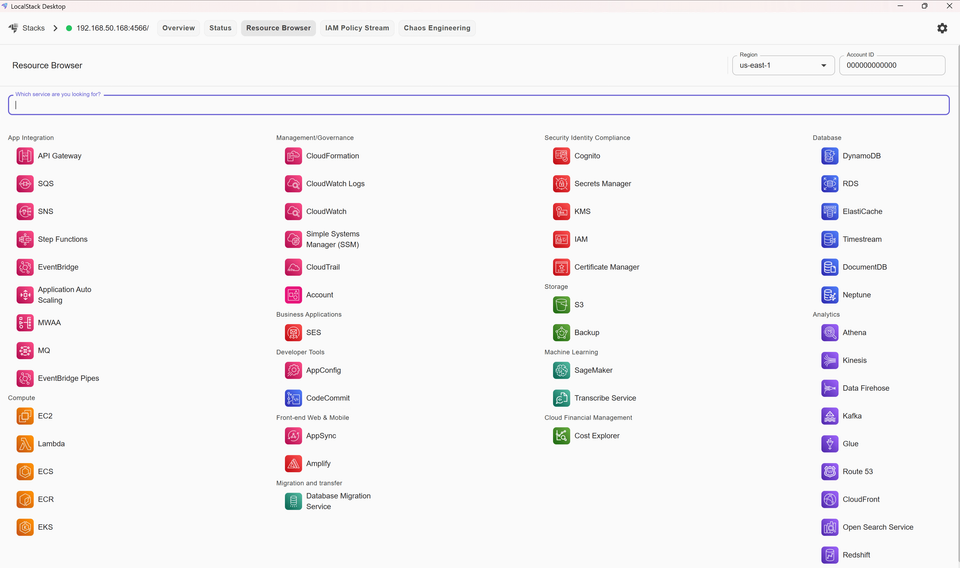
What if you could spin up S3 buckets, Lambda functions, and DynamoDB tables on your laptop - without spending a penny or touching real AWS?
If you're learning AWS or building cloud applications, you've probably worried about test environment costs. LocalStack solves this by running AWS services entirely on your local machine.
What Is LocalStack?
LocalStack is a cloud service emulator that mimics AWS on your computer. It uses the same API calls, SDKs, and service behaviors as real AWS. Your application can't tell the difference.
S3 buckets, Lambda functions, DynamoDB tables, and SQS queues all run locally. You can even work offline.
Why Use LocalStack?
For Learning
AWS's free tier runs out quickly when experimenting. Lambda invocations add up, forgotten DynamoDB tables keep charging, and you're constantly worried about costs. LocalStack removes that anxiety - experiment freely without any AWS bill.
You can break things safely. Misconfigure IAM policies to see what happens. Create dozens of resources without consequences. LocalStack also speeds up feedback loops. CloudFormation deployments that take minutes on AWS happen in seconds locally.
For Development
LocalStack improves professional workflows in three ways:
- Better Testing: Write integration tests that actually test cloud infrastructure. Your CI/CD pipeline runs full end-to-end tests against LocalStack without AWS credentials or test accounts.
- Team Consistency: Everyone runs the same LocalStack environment. No more "works on my AWS account" problems. Infrastructure-as-code gets tested locally before touching production.
- Easier Debugging: Develop Lambda functions with real breakpoints. Step through code and inspect variables using your IDE's debugging tools - all running on localhost.
Getting Started
Option 1: Using pip
pip install localstack
localstack start
Option 2: Using Docker Compose (Recommended)
Create a docker-compose.yml file:
services:
  localstack:
    container_name: "localstack-main"
    image: localstack/localstack
    ports:
      - "127.0.0.1:4566:4566"
      - "127.0.0.1:4510-4559:4510-4559"
    environment:
      - DEBUG=0
    volumes:
      - "./volume:/var/lib/localstack"
      - "/var/run/docker.sock:/var/run/docker.sock"
For more configuration options, check the official LocalStack documentation.
Start LocalStack:
docker-compose up -d
Check status:
docker-compose ps
Stop when done:
docker-compose down
Using LocalStack
Point your AWS CLI at LocalStack:
aws --endpoint-url=http://localhost:4566 s3 mb s3://my-test-bucket
The only difference is that --endpoint-url flag. Everything else works identically to real AWS.
What Services Are Available?
The free Community Edition includes:
- Storage: S3
- Compute: Lambda, EC2
- Databases: DynamoDB (including Streams)
- Messaging: SQS, SNS, Kinesis, EventBridge
- API: API Gateway (REST)
- Infrastructure: CloudFormation, Step Functions
- Security: IAM, Secrets Manager, KMS, STS
- Monitoring: CloudWatch (Logs and Metrics)
- Analytics: OpenSearch, Redshift, Kinesis Firehose
That's enough to build and test most serverless applications for free.
The pro version adds ECS, EKS, RDS, ElastiCache, AppSync, and features like full IAM policy enforcement and cloud pods for sharing state between team members.
Real-World Examples
Building an Image Upload Service
Say you're building an application that uploads user photos to S3. Normally, you'd create buckets on AWS, set up permissions, and pay for every test upload.
With LocalStack, you just start it locally, point your AWS SDK to http://localhost:4566, and test unlimited uploads on your laptop. When ready to deploy, remove the endpoint configuration and your code works on real AWS.
More Complex Scenarios
LocalStack handles real-world architectures too:
- Event-Driven Systems: Build a Lambda function that triggers when files land in S3, processes them, and stores results in DynamoDB. Test the entire flow locally before deploying.
- Microservices Communication: Set up SQS queues between services, test message handling, retry logic, and dead-letter queues without touching AWS.
- API Development: Create API Gateway endpoints that invoke Lambda functions, validate request/response formats, and test authentication - all on localhost.
- Infrastructure as Code: Write CloudFormation or CDK templates, deploy them to LocalStack, catch errors early, iterate quickly, then deploy to real AWS when everything works.
The workflow is always the same - build and test locally with LocalStack, deploy to AWS with confidence.
What About Limitations?
LocalStack isn't a perfect mirror of AWS - some behaviours differ slightly. Timing issues and eventual consistency don't always match exactly. The free version doesn't fully enforce complex IAM policies, and newer AWS features take a while to get implemented.
That said, for learning and development work, you'll catch most issues locally. The edge cases that slip through typically show up in staging environments where they're easier to handle anyway.
Is LocalStack Worth Using?
If you're learning AWS, absolutely. Being able to experiment without worrying about costs or breaking things is huge. You can try ideas, fail fast, and learn without the mental overhead of tracking resources and bills.
For professional development, it's equally useful. The speed improvements alone make it worthwhile - no more waiting for CloudFormation stacks or Lambda deployments during development. Your tests run faster, your team stays aligned, and you catch infrastructure issues before they reach production.
LocalStack isn't going to replace real AWS for actual deployments, but it makes the entire development process smoother and more enjoyable. You'll ship features faster and with more confidence knowing you've already tested everything locally.
Want to run S3 storage on your own hardware? If you need a permanent S3-compatible storage solution that you can host yourself, check out my guide on setting up MinIO - your own S3 server in under 5 minutes.



Member discussion