Kubernetes 1.35: In-Place Pod Vertical Scaling Reaches GA
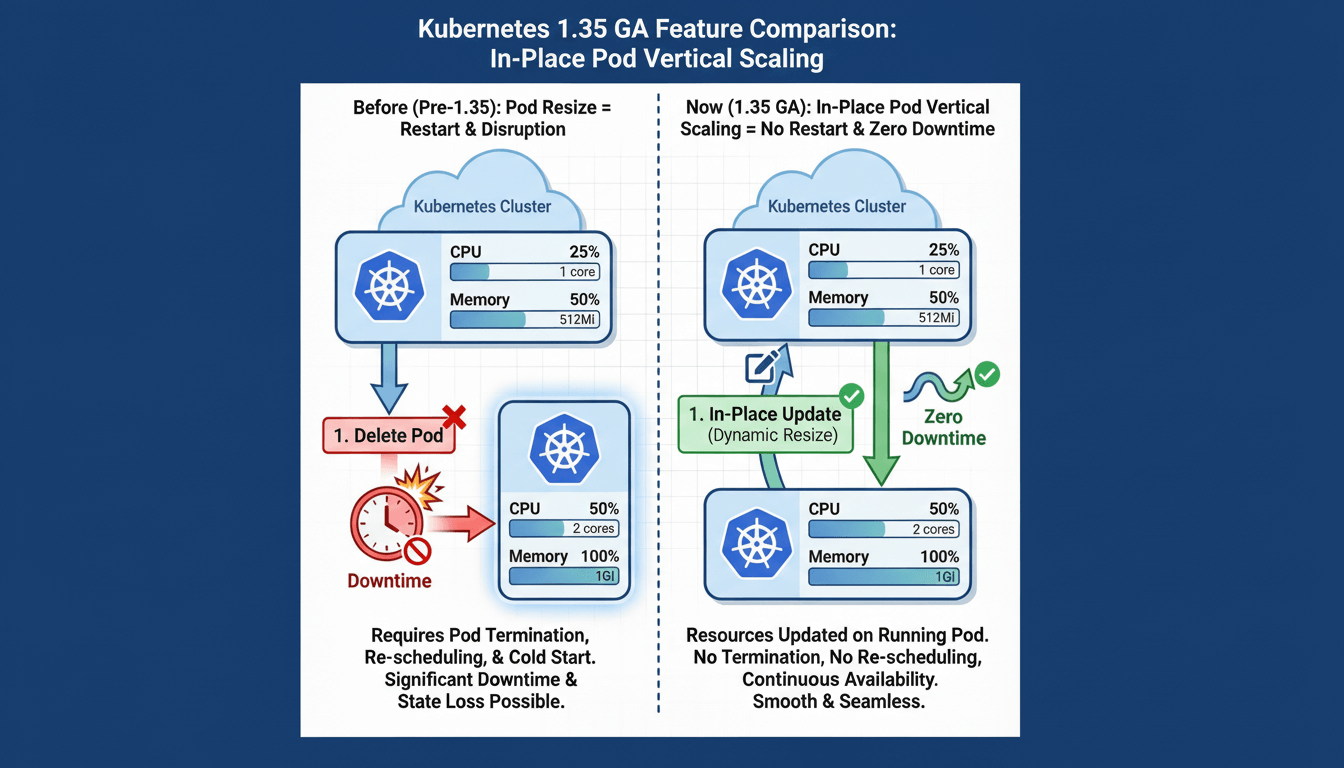
Kubernetes v1.35, released on 17 December 2025, brings the long-awaited in-place pod vertical scaling feature to general availability (GA). This feature, officially called 'In-Place Pod Resize', allows administrators to adjust CPU and memory resources for running containers without recreating pods.
The Traditional Approach to Resource Scaling
Before this feature, scaling pod resources required deleting and recreating the pod:
1. Update deployment/pod specification with new resource values
2. Kubernetes terminates the existing pod
3. Scheduler creates a new pod with updated resources
4. Container runtime starts the new pod
5. Application initialises and becomes ready
This approach causes:
- Dropped network connections
- Loss of in-memory application state
- Service disruption during pod restart
- Extended downtime for applications with long startup times
What is In-Place Pod Vertical Scaling?
In-Place Pod Vertical Scaling enables runtime modification of CPU and memory resource requests and limits without pod recreation. The Kubelet adjusts cgroup limits for running containers, allowing resource changes with minimal disruption.
Development Timeline
- v1.27 (April 2023): Alpha release
- v1.33 (May 2025): Beta release
- v1.35 (December 2025): General availability (stable)
The feature required 6+ years of development to solve complex challenges, including container runtime coordination, scheduler synchronisation, and memory safety guarantees.
Key Features in v1.35
1. Memory Limit Decrease
Previous versions prohibited memory limit decreases due to out-of-memory (OOM) concerns. Version 1.35 implements best-effort memory decrease with safety checks:
- Kubelet verifies current memory usage is below the new limit
- Resize fails gracefully if usage exceeds the new limit
- Not guaranteed to prevent OOM, but significantly safer than forced decrease
Example:
# Previously prohibited, now allowed
resources:
  requests:
    memory: "512Mi"  # Decreased from 1Gi
  limits:
    memory: "1Gi"    # Decreased from 2Gi
2. Prioritised Resize Queue
When node capacity is insufficient for all resize requests, Kubernetes prioritises them by:
- PriorityClass value (higher first)
- QoS class (Guaranteed > Burstable > BestEffort)
- Duration deferred (oldest first)
This ensures critical workloads receive resources before lower-priority pods.
3. Enhanced Observability
New metrics and events improve resize operation tracking:
Kubelet Metrics:
pod_resource_resize_requests_totalpod_resource_resize_failures_totalpod_resource_resize_duration_seconds
Pod Conditions:
PodResizePending: Request cannot be immediately grantedPodResizeInProgress: Kubelet is applying changes
4. VPA Integration
Vertical Pod Autoscaler (VPA) InPlaceOrRecreate update mode graduated to beta, enabling automatic resource adjustment using in-place resize when possible.
How It Works
Resize Policies
Containers specify restart behaviour for each resource type:
apiVersion: v1
kind: Pod
metadata:
  name: example
spec:
  containers:
  - name: app
    image: nginx:1.27
    resources:
      requests:
        cpu: "500m"
        memory: "512Mi"
      limits:
        cpu: "1000m"
        memory: "1Gi"
    resizePolicy:
    - resourceName: cpu
      restartPolicy: NotRequired      # No restart for CPU changes
    - resourceName: memory
      restartPolicy: RestartContainer  # Restart required for memory
Policy Options:
NotRequired: Apply changes without container restart (default for CPU)RestartContainer: Restart container to apply changes (often needed for memory)
Applying Resource Changes
Use the --subresource=resize flag with kubectl (requires kubectl v1.32+):
kubectl patch pod example --subresource=resize --patch '
{
  "spec": {
    "containers": [
      {
        "name": "app",
        "resources": {
          "requests": {"cpu": "800m"},
          "limits": {"cpu": "1600m"}
        }
      }
    ]
  }
}'
Monitoring Resize Status
Check desired vs actual resources:
# Desired (spec)
kubectl get pod example -o jsonpath='{.spec.containers[0].resources}'

# Actual (status)
kubectl get pod example -o jsonpath='{.status.containerStatuses[0].resources}'
View resize conditions:
kubectl get pod example -o jsonpath='{.status.conditions[?(@.type=="PodResizeInProgress")]}'
kubectl describe pod example | grep -A 10 Events
Use Cases
1. Peak Hour Resource Scaling
Scale resources to match daily traffic patterns without service disruption. For example, scale up CPU/memory at 08:55 for business hours, then scale down at 18:05 after hours, eliminating the need for pod recreation.
2. Database Maintenance Operations
Temporarily increase CPU allocation for intensive maintenance tasks like VACUUM or REINDEX operations, then restore normal allocation once complete. This avoids pod restart and preserves warm database caches.
3. JIT Compilation Warmup
Provide additional CPU during application startup for JIT compilation warmup, then reduce allocation once the application reaches steady state. Particularly beneficial for Java applications with large codebases.
4. Cost Optimisation
Dynamically right-size resources to reduce waste by scaling down during low-traffic periods, reducing over-provisioning based on actual usage patterns, and implementing time-based scaling without pod recreation overhead.
Limitations and Constraints
Resource Support:
- Only CPU and memory can be resized (GPU, ephemeral storage, hugepages remain immutable)
- Init and ephemeral containers cannot be resized
- QoS class cannot change during resize
Platform Requirements:
- Not supported on Windows nodes
- Requires compatible container runtime (containerd v2.0+, CRI-O v1.25+)
- Cannot resize with static CPU or Memory manager policies
Important Behaviours:
- Most runtimes (Java, Python, Node.js) require restart for memory changes
- Updating Deployment specs does not auto-resize existing pods
- Cannot remove requests or limits entirely, only modify values
Upgrading to Kubernetes v1.35
Prerequisites
- Kubernetes v1.34.x cluster
- kubectl v1.32+ client
- Compatible container runtime
Upgrade Process
1. Add v1.35 repository to all nodes:
# On each node
curl -fsSL https://pkgs.k8s.io/core:/stable:/v1.35/deb/Release.key | \
  sudo gpg --dearmor -o /etc/apt/keyrings/kubernetes-1.35-apt-keyring.gpg

echo 'deb [signed-by=/etc/apt/keyrings/kubernetes-1.35-apt-keyring.gpg] https://pkgs.k8s.io/core:/stable:/v1.35/deb/ /' | \
  sudo tee /etc/apt/sources.list.d/kubernetes-1.35.list

sudo apt update
2. Upgrade control plane:
sudo apt-mark unhold kubeadm
sudo apt install -y kubeadm=1.35.0-1.1
sudo kubeadm upgrade apply v1.35.0 -y
sudo apt-mark unhold kubelet kubectl
sudo apt install -y kubelet=1.35.0-1.1 kubectl=1.35.0-1.1
sudo systemctl restart kubelet
3. Upgrade workers (one at a time):
kubectl drain <worker-name> --ignore-daemonsets --delete-emptydir-data --force

ssh <worker-node>
sudo apt-mark unhold kubeadm kubelet kubectl
sudo apt install -y kubeadm=1.35.0-1.1 kubelet=1.35.0-1.1 kubectl=1.35.0-1.1
sudo kubeadm upgrade node
sudo systemctl restart kubelet

kubectl uncordon <worker-name>
4. Verify upgrade:
kubectl get nodes
# All nodes should show v1.35.0
Testing In-Place Resize
Basic CPU Resize Test
apiVersion: v1
kind: Pod
metadata:
  name: cpu-test
spec:
  containers:
  - name: nginx
    image: nginx:1.27
    resources:
      requests:
        cpu: "250m"
      limits:
        cpu: "500m"
    resizePolicy:
    - resourceName: cpu
      restartPolicy: NotRequired
Create pod and verify baseline:
kubectl apply -f cpu-test.yaml
kubectl get pod cpu-test -o jsonpath='{.status.containerStatuses[0].restartCount}'
# Output: 0
Resize CPU:
kubectl patch pod cpu-test --subresource=resize --patch '
{
  "spec": {
    "containers": [{
      "name": "nginx",
      "resources": {
        "requests": {"cpu": "800m"},
        "limits": {"cpu": "800m"}
      }
    }]
  }
}'
Verify no restart occurred:
kubectl get pod cpu-test -o jsonpath='{.status.containerStatuses[0].restartCount}'
# Output: 0 (unchanged)

kubectl get pod cpu-test -o jsonpath='{.spec.containers[0].resources.requests.cpu}'
# Output: 800m (updated)
Memory Decrease Test
# Create pod with high memory
kubectl apply -f memory-test.yaml

# Increase memory first
kubectl patch pod memory-test --subresource=resize --patch '
{
  "spec": {
    "containers": [{
      "name": "app",
      "resources": {
        "requests": {"memory": "1Gi"},
        "limits": {"memory": "2Gi"}
      }
    }]
  }
}'

# Decrease memory (new in v1.35)
kubectl patch pod memory-test --subresource=resize --patch '
{
  "spec": {
    "containers": [{
      "name": "app",
      "resources": {
        "requests": {"memory": "512Mi"},
        "limits": {"memory": "1Gi"}
      }
    }]
  }
}'
Best Practices
Testing: Verify application behaviour in non-production before enabling in production.
Resize Policies: Use NotRequired for CPU (usually safe), RestartContainer for memory (often requires restart).
Monitoring: Track Kubelet metrics for resize operations, alert on persistent PodResizePending conditions, monitor OOM events after decreases.
Resource Changes: Make incremental adjustments, avoid large jumps, verify current usage before decreasing limits.
Priority: Use PriorityClasses for critical workloads to ensure resize priority during capacity constraints.
Troubleshooting
Resize Rejected (stuck in PodResizePending): Check node capacity (kubectl describe node), verify QoS class compatibility, review kubelet configuration for static resource managers, ensure resize policy allows the change.
Unexpected Restarts: Memory changes often require restart regardless of policy. Use RestartContainer for memory, test application behaviour, monitor OOM events.
OOM After Memory Decrease: Verify current usage first (kubectl top pod), make gradual decreases, ensure application can release memory under pressure, consider using RestartContainer to force release.
Anti-Patterns: When NOT to Use In-Place Resize
Important: In-place pod resize is a powerful feature that can become an anti-pattern if misused. It should be reserved for specific edge cases, not used as a general scaling strategy.
Why It Can Be an Anti-Pattern
1. Violates Immutable Infrastructure: Kubernetes follows "cattle not pets" philosophy with ephemeral, replaceable pods. In-place resize makes pods mutable and long-lived, contradicting this design principle and reducing system resilience.
2. Breaks GitOps: Manual pod patching creates drift between Git repository and cluster reality. Next deployment overwrites manual changes, cluster state doesn't match version control, and you cannot reproduce environments from Git.
3. Configuration Drift: Pods in the same Deployment can have different resource allocations, causing inconsistent behaviour across replicas, difficult debugging, and unpredictable load distribution.
4. Reduces Failure Isolation: Encourages keeping pods alive longer rather than quick replacement, which can hide underlying issues like memory leaks and delay necessary restarts.
5. Better Alternatives Exist: Traffic spikes should use HPA (scale out), resource changes should update Deployments (declarative), and environment differences should use Kustomize/Helm.
Some Valid Use Cases
1. Stateful Applications with Expensive Startup: Databases with 15+ minute startup times (cache warming, index loading). Example: Scale up CPU for PostgreSQL VACUUM/ANALYZE operations, then scale down. Justified because recreation cost exceeds configuration drift cost.
2. Single-Instance Workloads: Legacy applications with shared file locks, non-distributed state, or connection pooling limitations. Justified because horizontal scaling isn't possible without full rewrite.
3. Emergency Production Incidents: Immediate relief for OOM conditions at 3am when proper solutions require hours of testing. Must be temporary (fix properly within 24 hours) and documented.
4. Predictable Temporary Spikes: Monthly report generation requiring 4x CPU for 2 hours. Automate with CronJobs to scale up/down on schedule. Justified because running 4x resources 24/7 wastes 96% of allocation.
5. Testing and Capacity Planning: Non-production experimentation to measure performance at different resource levels and determine optimal production sizing.
Future Enhancements
Kubernetes SIG-Node is working on:
- Removing static CPU/Memory manager restrictions
- Support for additional resource types
- Improved safety for memory decreases (runtime-level checks)
- Resource pre-emption (evict lower-priority pods for high-priority resizes)
- Better integration with horizontal autoscaling
Conclusion
In-Place Pod Vertical Scaling addresses a long-standing Kubernetes limitation, enabling resource adjustments without service disruption. The v1.35 GA release brings production-ready capability with important improvements including memory decrease support, prioritised queuing, and enhanced observability.
While this feature enables dynamic resource management for stateful workloads and emergency scenarios, it should complement rather than replace traditional scaling patterns. Use HPA for traffic-based scaling, update Deployments for permanent changes, and reserve in-place resize for the specific edge cases where pod recreation cost genuinely exceeds operational complexity.




Member discussion